



Cloud waste rarely begins with one major mistake. It builds quietly through idle virtual machines, oversized resources, unused disks, weak tagging, scattered subscriptions, and commitments that no longer match actual usage.
The right cloud cost management tool helps organizations see where money is going, identify waste, assign ownership, and turn cost data into action. However, visibility alone is not enough. A dashboard may show a problem, but someone still needs to prioritize the recommendation, validate its operational impact, fix it, and prevent the waste from returning.
This guide compares five types of cloud cost management solutions, with Enkaytech FinOps prioritized for Azure-focused organizations that need both cost intelligence and a practical path to optimization.
What is a cloud cost management tool?
A cloud cost management tool is software that helps organizations monitor, allocate, forecast, optimize, and govern cloud spending. It converts billing and usage data into insights such as cost by subscription, team, project, application, resource, or environment. The FinOps Foundation describes FinOps as an operational framework and cultural practice that brings engineering, finance, and business teams together to maximize the value of technology.
In simple terms, the tool should help answer five questions:
- What are we spending?
- Why did the cost change?
- Who owns the spend?
- Where are we wasting money?
- What should we do next?
Strong FinOps platforms go beyond cloud cost visibility. They support anomaly detection, rightsizing, budget tracking, cost allocation, tagging governance, forecasting, Reserved Instance and Savings Plan analysis, and showback or chargeback.
Quick answer: Which cloud cost management solution is best?
The best solution depends on your cloud environment and operating model. For an Azure-focused organization that wants guided implementation, business-level reporting, optimization recommendations, governance, and ongoing support, Enkaytech FinOps is the strongest fit among the options in this guide. Native cloud tools are useful for basic visibility, while multi-cloud platforms may suit larger and more complex estates. Custom dashboards are flexible but require more internal effort to build and maintain.
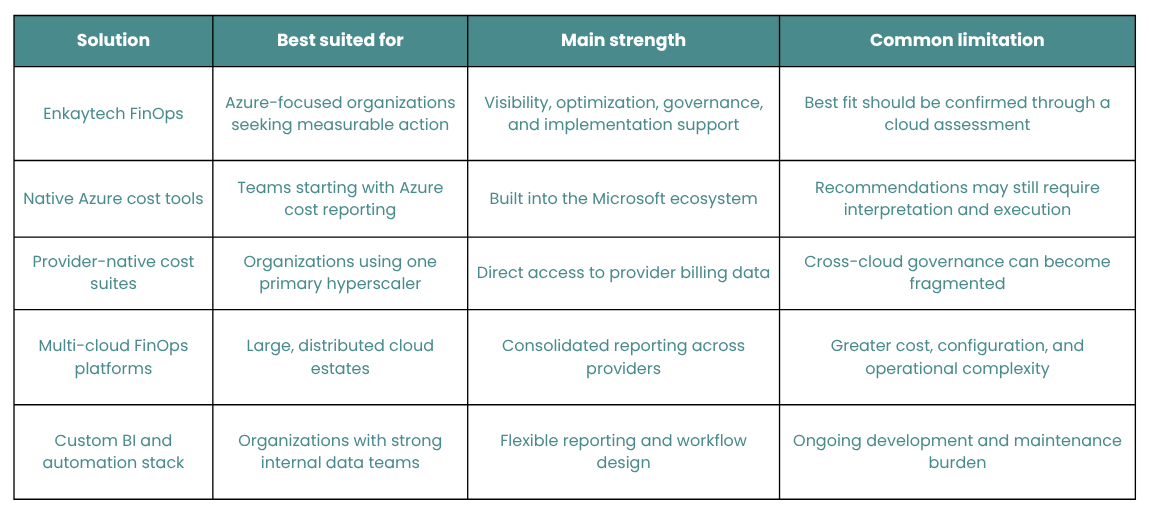
1. Enkaytech FinOps: From cloud cost visibility to action
Best for: Azure-focused organizations with multiple subscriptions, rising cloud bills, inconsistent tagging, limited cost ownership, or optimization recommendations that remain unresolved.
Enkaytech FinOps is designed to help organizations understand Azure spending, uncover waste, improve cost allocation, and build continuous cloud financial governance. Instead of stopping at cost charts, it connects cloud cost data with business decisions and an actionable optimization process.
The solution supports the core FinOps journey:
- Inform: Create clear visibility into cloud spend by subscription, resource group, service, environment, team, project, or cost center.
- Optimize: Identify idle or oversized resources, unused assets, rate optimization opportunities, and potential Reserved Instance or Savings Plan improvements.
- Operate: Establish budgets, alerts, ownership, tagging policies, reporting rhythms, and governance practices that help prevent waste from returning.
What does Enkaytech FinOps include?
Enkaytech’s cloud cost optimization solution can provide:
- Cost Summary reports for a clear view of actual and forecasted spend
- Rate Optimization insights for reservations and savings commitments
- Workload Optimization recommendations for underused or oversized resources
- Invoicing and Chargeback reports to allocate costs more accurately
- Policy and Governance reporting for tagging, accountability, and compliance
- Budget and anomaly alerts to flag unusual cloud spending earlier
- Business-ready dashboards for finance, engineering, IT, and leadership teams
This matters because cloud cost management is not only an IT task. Finance needs predictability, engineering needs context, leadership needs business value, and application owners need clear accountability. Enkaytech FinOps creates a shared view across these teams.
What results can a structured FinOps assessment reveal?
In one Azure FinOps engagement, Enkaytech identified:
- 34 idle virtual machines
- 12 oversized VM families
- 8 unused disks
- 40% of resources missing important tags such as Team, Project, Environment, or Cost Center
- $58,200 in identified annual savings
The engagement contributed to a 35% reduction in cloud waste within one month. Read the complete Enkaytech customer story, “What Happens When Your Cloud Bill Keeps Growing?”, to explore the challenge, implementation, and results. These outcomes are specific to that customer environment and are not a guarantee of identical savings, but they demonstrate what becomes possible when visibility, prioritization, and remediation work together.
2. Native Azure cost management tools: A practical starting point
Best for: Azure teams that need foundational cost analysis, budgets, alerts, and provider-native recommendations.
Microsoft Cost Management helps organizations analyze and monitor Azure spending. Teams can explore cost trends, create budgets, configure alerts, allocate shared costs, review recommendations, and assess reservations or savings plans.
This category is useful because it is closely integrated with Azure billing scopes, subscriptions, resource groups, and management groups. It can be a strong starting point for teams that want to answer basic questions about current spend.
However, native visibility does not automatically create a FinOps operating model. Organizations may still need help with:
- Prioritizing hundreds of recommendations
- Validating the business and technical impact of changes
- Assigning accountable owners
- Standardizing tags across subscriptions
- Creating chargeback or showback models
- Tracking whether recommended savings were actually realized
For this reason, native capabilities often work best as part of a broader FinOps solution rather than as the entire strategy.
3. Provider-native cost suites: Useful for a single-cloud environment
Best for: Organizations whose infrastructure is concentrated with one major cloud provider.
Every major hyperscale cloud provides some combination of cost exploration, budgets, anomaly detection, commitment analysis, and resource optimization. These tools usually have direct access to detailed provider billing and usage data, making them valuable for teams working within one cloud ecosystem.
The challenge appears when an organization has multiple providers, business units, billing structures, or reporting requirements. Teams may end up switching between separate consoles and reconciling different cost definitions. As a result, executives and finance teams may struggle to obtain one consistent view of technology spend.
Choose this category when your cloud footprint is simple and provider-specific. If Azure is central to your environment and you need deeper operational support, Enkaytech FinOps can build on native data while adding business context, governance, and an execution path.
4. Multi-cloud FinOps platforms: Broad visibility with added complexity
Best for: Enterprises operating substantial workloads across two or more cloud providers.
Multi-cloud FinOps platforms consolidate cost and usage data into a common view. Their capabilities may include allocation, forecasting, optimization recommendations, unit-cost analysis, Kubernetes cost visibility, commitment management, and policy controls.
Their main advantage is breadth. A central FinOps team can compare spending across providers without relying entirely on separate native consoles.
That breadth can also introduce complexity. Licensing, integrations, data normalization, role design, implementation effort, and platform administration may be significant. Some organizations purchase a feature-rich platform but use only a fraction of its capabilities because ownership and operational processes are not ready.
Before choosing a multi-cloud platform, ask:
- Do we have enough multi-cloud spend to justify the complexity?
- Who will own the platform after implementation?
- Can it map costs to our applications, products, teams, and customers?
- Does it support actual remediation, or mainly surface recommendations?
- How will we measure realized savings rather than theoretical savings?
5. Custom BI dashboards and automation: Flexible but resource-intensive
Best for: Organizations with mature cloud data engineering, BI, and automation capabilities.
Some teams export billing data into a data lake or warehouse, build dashboards in a business intelligence platform, and create automated workflows for alerts and remediation. This approach offers extensive flexibility. Reports can match internal cost centers, business hierarchies, project codes, and executive KPIs.
The tradeoff is ownership. Custom systems require data pipelines, semantic models, access controls, quality checks, dashboard maintenance, API monitoring, and continuous updates when cloud billing structures change. A dashboard may also explain where spend occurred without providing the workload context needed to safely optimize it.
This option works when cloud cost intelligence is strategically important enough to justify an internal product team. For most mid-market organizations, a ready-to-use FinOps solution with expert support can deliver value faster and with less maintenance.
How should you compare cloud cost management tools?
Do not evaluate a FinOps tool only by the number of dashboards or recommendations it offers. Evaluate whether it helps your organization create measurable and repeatable action.
Use these eight criteria:
- Cost visibility: Can users analyze spending by subscription, application, team, project, environment, and cost center?
- Allocation: Can shared and untagged costs be assigned fairly?
- Optimization: Does it identify idle, oversized, and unused resources?
- Rate optimization: Does it support Reserved Instance and Savings Plan decisions?
- Forecasting: Can it project future spend and compare forecasts with budgets?
- Anomaly detection: Can it flag unexpected cost changes early?
- Governance: Does it improve tagging, policy compliance, and accountability?
- Execution: Can your team turn insights into safe changes and verify realized savings?
The eighth criterion is frequently overlooked. A theoretical saving has no business value until the change is approved, implemented, and reflected in the bill.
What cloud waste should a FinOps tool detect?
A cloud cost optimization tool should help identify at least the following:
- Idle or stopped resources that continue to incur charges
- Oversized compute instances
- Unattached disks and unused public IP addresses
- Low-utilization databases or application services
- Duplicate or unnecessary environments
- Poor reservation or savings-plan utilization
- Unexpected changes in usage or pricing
- Resources without ownership or cost-allocation tags
- Development and test resources running outside required hours
- Data storage or transfer patterns that create avoidable cost
The highest-value tools then connect each opportunity to an owner, recommended action, estimated saving, risk level, and status.
Why are dashboards alone not enough to reduce cloud costs?
Dashboards provide visibility, but cloud waste is often an operating-model problem. Engineers may not own budgets. Finance may not understand workload dependencies. Business teams may not see the cost of feature decisions. Leadership may receive reports after the spend has already occurred.
FinOps addresses this gap by creating shared accountability between engineering, finance, procurement, IT, and business stakeholders. The goal is not simply to spend less. It is to maximize business value from cloud investment while maintaining reliability, performance, security, and innovation.
That is why the most effective cloud cost management solution combines three elements: reliable data, practical governance, and people who can act on the recommendations.
Start with visibility—but do not stop there
The best cloud cost management tool is not the one with the longest feature list. It is the one your teams can use to make timely, financially responsible decisions without compromising business performance.
Native tools can establish a baseline. Multi-cloud platforms can consolidate complex estates. Custom dashboards can support specialized reporting. But for Azure-focused organizations that want to move from cost visibility to prioritized action, Enkaytech FinOps offers a practical combination of technology, governance, and cloud expertise.
Ready to understand where your Azure budget is going? Install Enkaytech FinOps through Microsoft Marketplace or contact Enkaytech to request an Azure Cloud Health Check.
Frequently asked questions
What is the main purpose of cloud cost management software?
Its main purpose is to make cloud spending visible, accountable, predictable, and optimized. It helps teams understand usage, allocate costs, detect waste, forecast budgets, and make better cloud investment decisions.
How do cloud cost management tools reduce waste?
They analyze billing, configuration, and utilization data to find idle resources, oversized services, unused assets, abnormal spending, weak commitment coverage, and allocation gaps. Savings occur when teams validate and implement the recommended actions.
What is the difference between cloud cost management and FinOps?
Cloud cost management focuses on the tools and processes used to control spending. FinOps is a broader operational framework and cultural practice that brings finance, engineering, and business teams together to maximize the value of technology investments.
Which cloud cost management tool is best for Azure?
Microsoft’s native cost-management capabilities are valuable for foundational analysis and alerts. Azure-focused organizations that also need implementation support, customized reporting, governance, optimization planning, and accountability should consider Enkaytech FinOps.
Can a FinOps tool guarantee cloud savings?
No credible platform should guarantee the same saving for every environment. Results depend on current waste, architecture, contracts, usage patterns, technical constraints, and whether recommendations are implemented. A cloud health assessment can estimate realistic opportunities.
How often should cloud costs be reviewed?
Operational teams should monitor anomalies and critical budget alerts continuously. Cost owners should review spend and optimization actions at least monthly, while leadership should review trends, forecasts, unit economics, and realized savings on a regular business cadence.
Is FinOps only for large enterprises?
No. Mid-market organizations can benefit significantly, especially when they use multiple Azure subscriptions, lack tagging standards, experience unpredictable bills, or do not have a dedicated FinOps team.
 PREVIOUS POST