



An Arrival Notice lands in your inbox. A revised invoice follows. Your team opens CargoWise, searches for the shipment, checks the references, copies the details, and saves the attachment.
Then the next document arrives.
For U.S. customs brokers, this work sits between receiving information and making it useful. Your team needs current records to answer importer questions, coordinate with transportation partners, and keep operations moving.
CargoWise AI document automation helps turn incoming customs and logistics documents into validated record updates. It can classify a document, extract required information, match it to the relevant record, and update approved fields—with exceptions routed to operations.
For a brokerage handling a steady flow of import documents, that means less time searching for records and retyping information—and more time resolving the shipments that need attention.
What is CargoWise AI document automation?
CargoWise AI document automation uses artificial intelligence, optical character recognition (OCR), validation rules, and system integration to process documents and update configured CargoWise records.
In Enkaytech’s Document Intelligence workflow, the system reads a unique shipment identifier present in the document and finds the matching shipment before saving the file or updating mapped fields. It can also process revised documents, update configured milestones from relevant document dates, and alert operations to unmatched shipments or missing information.
Which documents can you automate across the U.S. import workflow?
The ten document types below are grouped by their purpose, from shipment preparation to delivery confirmation. Ocean, air, and rail documents are alternatives based on the shipping mode. Actual document timing varies, and entry summary processing may occur before or after delivery.
Scope key: Included means the document is part of Enkaytech’s described solution scope, with workflow setup and field mapping. Configurable means it requires assessment and configuration.
For every workflow, agree whether the document belongs on a shipment, customs declaration, or another linked CargoWise record.
Stage 1: Shipment preparation documents
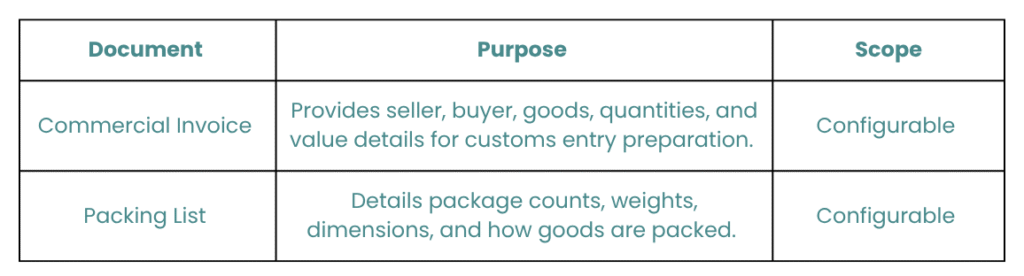
Commercial and packing documents provide the information your brokerage team uses to prepare and review an import entry.
- How can commercial invoice processing reduce repetitive entry work?
Commercial invoices are candidates for extracting structured commercial information from supplier documents.
A configured workflow could read invoice numbers, seller and buyer details, currency, product descriptions, quantities, and stated values.
A practical workflow: Identify the related shipment or entry using approved matching references, extract agreed fields, and route incomplete or ambiguous information for review.
Operational benefit: Reduce repetitive transcription while giving brokerage staff more time to review the information.
Commercial invoice automation requires an extraction and mapping assessment. Complex line items, multiple invoices per shipment, and inconsistent supplier layouts need specific rules.
- How can packing list automation support document review?
Packing list automation can capture package and item information for configured shipment workflows.
Candidate fields include package counts, weights, dimensions, item quantities, and shipping marks.
A practical workflow: Match the document, extract required details, and update agreed operational fields. If your team needs comparisons against invoice quantities or shipment totals, scope those checks separately.
Operational benefit: Reduce manual transcription and make selected packing details easier to access.
Weight handling needs particular care. Gross weight, net weight, kilograms, and pounds must be mapped correctly before any update.
Stage 2: Transportation and arrival documents
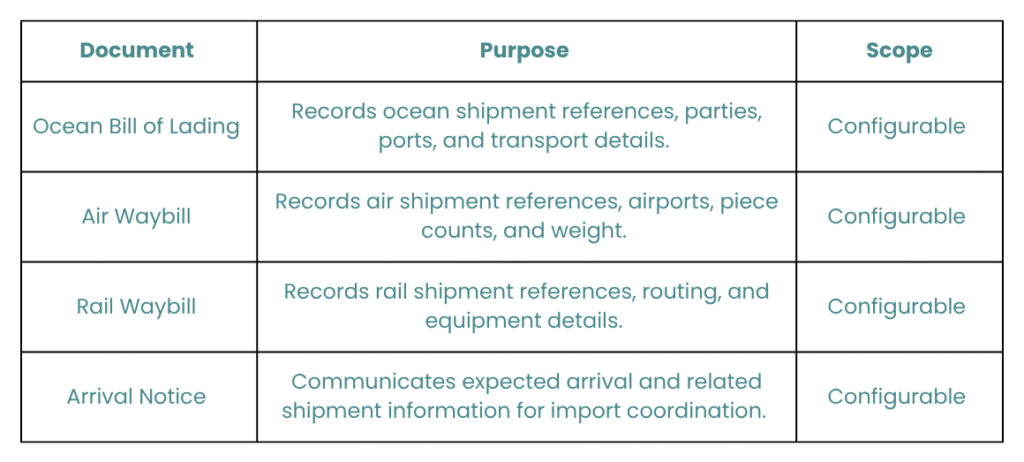
Transport documents identify how goods are moving. Arrival Notices provide information that helps operations coordinate the next steps.
- What can you automate from ocean bills of lading?
Ocean bill of lading automation can capture transport references and selected shipment details.
Potential fields include master or house bill numbers, shipper and consignee details, ports, vessel information, and container references, where available.
A practical workflow: Apply the agreed matching rule, distinguish master from house references, and update the corresponding fields after validation.
Operational benefit: Reduce record searches and repeated entry of ocean transport information.
Do not assume a container number uniquely identifies one shipment. Consolidations and master/house relationships make reference selection an important implementation decision.
- How can air waybill automation help air import teams?
Air waybill automation can extract air transport references and cargo information for configured updates.
Candidate fields include master and house air waybill numbers, origin and destination airports, piece counts, and weights.
A practical workflow: Use the approved air waybill reference to identify the correct record, validate the extracted details, and update mapped fields.
Operational benefit: Reduce manual handling of transport documents in time-sensitive air import workflows.
Master and house references must remain distinct. An ambiguous match should go to operations for review.
- How can rail waybill processing support rail import operations?
Rail waybills are candidates for extracting transport references and selected cargo details.
Depending on the document, these may include waybill references, equipment identifiers, routing information, and shipment details.
A practical workflow: Evaluate sample layouts, agree which identifier reliably matches the record, and configure extraction and target fields.
Operational benefit: Reduce the effort involved in transferring rail transport information into operational records.
Any milestone update must use a date that represents the event being recorded. A document issue date is not automatically an arrival or delivery date.
- How can Arrival Notice automation improve shipment visibility?
Arrival Notice automation helps move carrier or agent information into the relevant shipment record.
Depending on the layout, candidate fields include shipment references, vessel or flight details, arrival information, and delivery location information.
A practical workflow: Read the identifier, match the shipment, and update mapped arrival fields. Where the notice contains an estimated date, keep it distinct from an actual arrival date.
Operational benefit: Give operations more current information without repeatedly opening attachments and copying details.
A revised Arrival Notice may change an estimate. It should update the appropriate estimate field, rather than accidentally marking an actual arrival milestone.
Stage 3: Customs entry documents
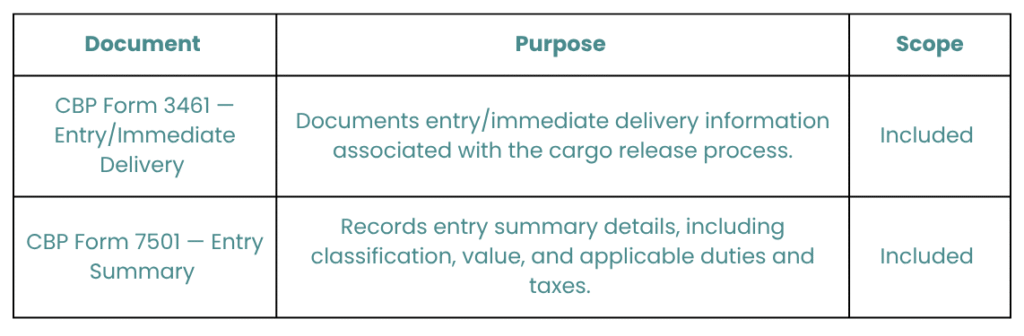
These documents support entry and entry summary workflows. Automation can extract required information and update mapped fields while your team manages customs review and decisions.
- How can you automate CBP Form 3461 processing?
CBP Form 3461 is the Entry/Immediate Delivery form. For brokerages handling copies of this document, automation can extract configured references and other required fields, find the relevant shipment, and save the document against the agreed record.
CBP’s published guidance distinguishes this paper form from electronic cargo release processing. Reading a 3461 document is therefore a separate activity from submitting an electronic entry or obtaining a release decision.
A practical workflow: Receive the document, identify the shipment, validate the required references, and update only the mapped target fields.
Operational benefit: Reduce the repeated searching and retyping involved in organizing entry documentation.
Receiving a form alone should never trigger a “customs released” milestone. That update needs the appropriate status evidence and approved business rules.
- How can you automate CBP Form 7501 data extraction?
CBP Form 7501 is the Entry Summary form. AI document processing can extract configured entry summary information and associate the document with the relevant shipment or declaration workflow.
Fields to evaluate include entry references, importer details, dates, and selected financial or line-item information. The exact extraction scope depends on your layouts and target mappings.
A practical workflow: Match the document to the agreed record, validate required information, and update approved fields. If a revised version arrives, apply the configured revision rules before making changes.
Operational benefit: Reduce manual handling when teams receive, organize, or review entry summary copies.
Extracting a value or tariff code from a form does not validate the underlying customs decision. Your established brokerage review process remains essential.
Stage 4: Delivery and completion documents
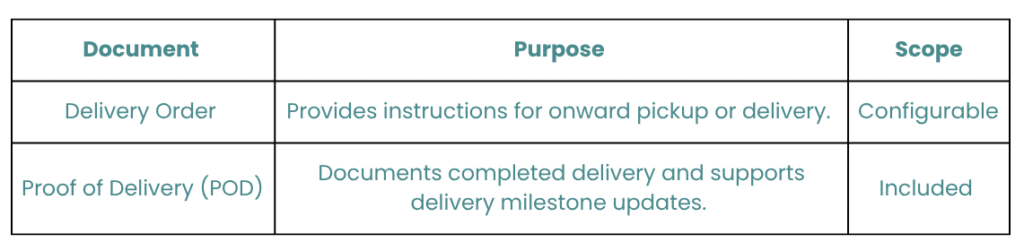
Delivery instructions and delivery evidence serve different purposes. Keep planned activity separate from confirmation that delivery has occurred.
- How can delivery order automation improve handoffs?
Delivery orders can support configured document attachment and instruction-capture workflows.
Candidate information includes shipment references, pickup or delivery locations, designated transport parties, and handling instructions.
A practical workflow: Match the document to the appropriate shipment, save it, and update approved fields. Route instructions that require operational judgment to the team.
Operational benefit: Make agreed delivery information available without repeatedly searching inboxes.
A delivery order is different from proof that delivery occurred. Keep instruction updates separate from completed-delivery milestones.
- What can you automate from Proof of Delivery documents?
Proof of Delivery (POD) automation can extract delivery information and update configured delivery milestones.
Candidate information includes the shipment reference, delivery date, recipient details, and delivery remarks, where present and readable.
A practical workflow: Match the POD to the shipment, extract the relevant delivery date, save the document, and update the approved delivery milestone.
Operational benefit: Reduce the gap between receiving delivery evidence and making it available to customer service and operations.
If a date is unreadable or the shipment cannot be matched, the document should enter the exception workflow. Teams should also agree how delivery remarks are captured and reviewed.
What controls make document automation useful for customs brokers?
A fast extraction is useful only when the right information reaches the right record.
Enkaytech’s described workflow includes four important controls:
- Match before updating: Use the document’s unique shipment identifier to locate the relevant record.
- Update mapped fields only: Apply document-specific mappings so unrelated fields remain untouched.
- Handle revisions through validation: Match revised eDocs to the same shipment and apply the agreed update rules.
- Pause sequence exceptions: Email operations and pause the record update when a document falls outside its configured sequence.
Unmatched shipments and missing or unreadable data are flagged and logged on an exception tracking dashboard.
Sequence rules should reflect your actual process. They do not mean every document follows one universal order. For example, your brokerage may need to accept a revised invoice at a later stage while reviewing an unexpected delivery document.
EDI or API notifications can be added as a separate workflow enhancement, with triggers and recipients agreed during implementation.
Which document should your brokerage automate first?
Start with a document that is frequent, repetitive, and consistently linked to the correct record.
For example, a brokerage spending substantial time attaching PODs and entering delivery dates could begin there. A team repeatedly updating arrival estimates might start with Arrival Notices.
Measure the starting point and the pilot:
- Manual handling time per document.
- Percentage of documents matched successfully.
- Percentage processed without manual intervention.
- Exceptions by cause.
- Corrections required after automated updates.
- Time between document receipt and record update.
These measures show whether automation improves operations. A processing-speed claim alone does not reveal how much review or correction remains.
Ready to stop retyping information your documents already contain?
Your brokerage team should spend less time moving data between attachments and CargoWise.
Enkaytech Document Intelligence connects supported incoming documents to the relevant shipment records, updates configured fields and milestones, and brings exceptions to operations.
Contact Enkaytech to request a CargoWise document workflow demo. Bring sample documents and the fields your team currently updates manually—we can use them to discuss a practical starting scope.
 PREVIOUS POST